In an era where digital privacy is becoming a luxury, the humble temporary email address has emerged as a critical tool for internet users worldwide. Every time you visit a new website, download an ebook, or sign up for a newsletter, you are asked for one thing: your email address. But have you ever stopped to think about what happens to that address once you've clicked "Submit"?
Your primary email is more than just a communication channel; it is your digital identity. It's linked to your bank accounts, your social media profiles, and your professional life. Giving it away to every random site on the internet is like giving out your home address to every stranger you meet on the street. This is where disposable email services like 30mail.in come into play.
What Exactly is a Temporary Email?
A temporary email address, often referred to as a throwaway email or burner email, is a short-lived email account that requires no registration and auto-deletes itself after a specified period of time. Unlike permanent accounts from providers like Gmail or Outlook, these addresses are designed for one-time use.
When you use 30mail.in, you aren't creating an account in the traditional sense. You are simply accessing an anonymous inbox that is generated the moment you land on the site. You can receive messages, verify accounts, and then simply close the tab—at which point the address and all its contents are wiped from memory. It is a practical tool for keeping unwanted promotions away from your personal inbox.
How Does Temporary Email Work?
The technology behind a temp mail service is direct and robust. When you request a temporary address, the server allocates a unique alias on an active domain. Any mail sent to this alias is routed to a temporary in-memory bucket linked to your browser session.
- No Registration: You don't need to provide your real name, phone number, or a recovery email.
- Real-Time Delivery: Modern services use WebSockets to push new emails to your screen instantly, making them convenient for OTP (One-Time Password) verification.
- Automatic Expiry: A timer (typically 10, 30, or 60 minutes) counts down. Once it hits zero, the server purges the data, ensuring that your one-time email is permanently removed.
Legitimate Situations Where You Need a Temp Email
1. Evaluating Software & Newsletters
Many online tools require an email to access sample guides or software demonstrations. Using a disposable address allows you to evaluate the tool without your primary inbox receiving ongoing promotional campaigns.
2. Downloading Ebooks and Whitepapers
Resource sites frequently ask for an email to download PDF reports. A throwaway email satisfies the form requirement without cluttering your real inbox with follow-up sales pitches.
3. One-Time Online Inquiries
When requesting quotes or one-off estimates from public directory sites, a secondary address prevents your personal contact details from being sold to third-party telemarketers.
4. Testing Web Applications
For developers and QA teams, temporary email is an essential utility. Testing user registration, password reset tokens, and notification templates requires multiple distinct addresses. Using 30mail.in allows you to validate these workflows without managing numerous permanent accounts.
5. Mitigating Primary Inbox Spam
By never giving out your primary email on public forums or untrusted submission forms, you stop spam at the source. If the website suffers a data breach, your primary email is not exposed.
Is Using a Temporary Email Safe?
Yes, but with one critical rule: never use a temporary email for sensitive or permanent accounts.
Because these addresses are public and expire quickly, they should never be used for banking, official government services, healthcare portals, or primary personal accounts. For everyday browsing, public form submissions, and quick confirmations, however, a disposable inbox protects your personal data from leaks.
How to Use 30mail.in Step by Step
- Visit the Homepage: Go to 30mail.in. An anonymous address is ready immediately.
- Select Your Domain: Choose an available domain suffix from the dropdown that suits your current testing needs.
- Copy the Address: One click copies the address to your clipboard.
- Use it on the Target Form: Paste it into the registration form you wish to test.
- Wait for the Email: Stay on the 30mail.in screen; incoming messages appear automatically via WebSockets within seconds.
- Explore Developer Tools: Pair temporary inboxes with our Test Data Generator when staging or testing user registration flows.
Temporary Email vs Your Real Email — Comparison Table
| Feature | Real Email (Gmail/Outlook) | Temp Email (30mail.in) |
|---|---|---|
| Signup Process | Personal info + Phone number | Zero signup required |
| Privacy Level | Publicly linked to identity | Not linked to real identity |
| Spam Protection | Manual filtering needed | Automatic elimination |
| Longevity | Permanent | Temporary (10 to 60 mins) |
| Security for Data Leaks | Real personal address exposed | Address expires and purges |
Conclusion
Using a temporary email address is one of the simplest and most effective ways to reclaim your privacy, stop spam, and secure your primary digital inbox. Whether you are a developer testing a new app or an everyday user tired of promotional junk, disposable email provides a simple layer of security.
📊 How Temporary Email Works: Step-by-Step Architecture Chart
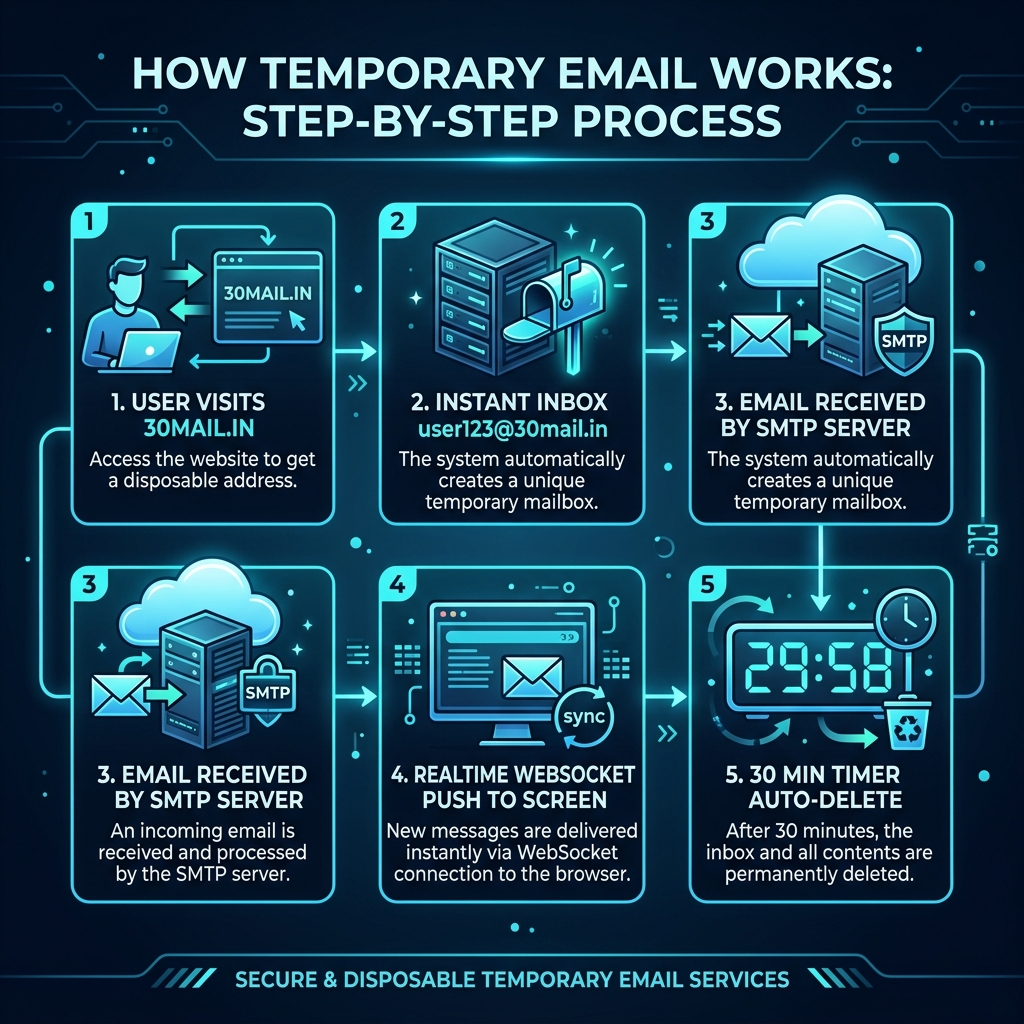
Architecture overview illustrating real-time WebSocket delivery and automatic memory deletion cycles at 30mail.in.
Frequently Asked Questions
Most temporary email services, including Free Mail, operate in receive-only mode to prevent spam relay abuse.
No. For your privacy and security, once the session timer expires, all messages are permanently erased from memory.
Yes. Free Mail is 100% free with no registration or payment required.